Knowledge Base
IMPORTANT ANNOUNCEMENT
In the event that the router is located inside the communications box, we will not have access, so the general electricity switch of the house must be lowered and raised to restart it and check if we already have internet.
Steps to follow:
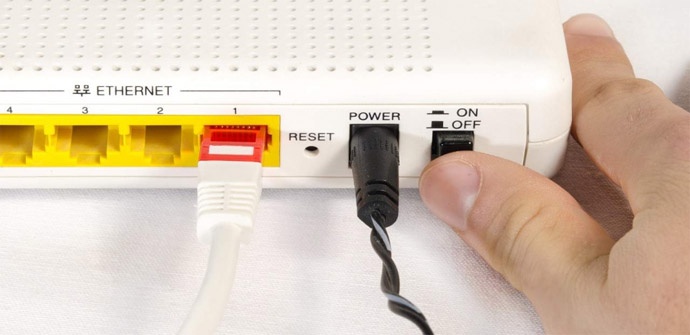
1_ Turn off and on your router and wait 2 minute, in case it is an electrical lockout problem. (If the problem persists, follow step 2).
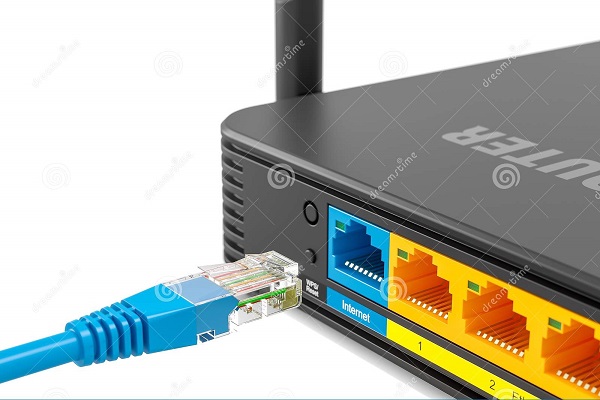
2_ Check that the internet indicator light is on, disconnect and reconnect the cable from the WAN port (BLUE COLOR), wait 2 min if the connection returns- (If the problem persists, follow step 3).
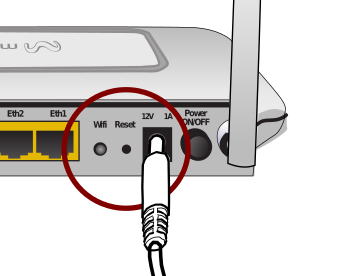
3_ Finally perform a reset of the router, this will leave the factory settings. This button is located behind the router, it is usually small, leave it pressed for more than 10 seconds, the complete restart will be done in approximately 2 min.
To reconnect to the wifi look under the router and will have the credentials (SSID and Password).
Once this step is finished, it may have been solved, in any case whether the internet works or not, inform the community administrator for the technician to reconfigure your credentials.
Last Updated: 27/10/2021 03:25
A total of 10 / 18 users found this article useful.